 Jatin K MalikandGitHub
fb9166ed9e
* feat(settings): run local VocaGateway from Speech Engine (podman-first)

Add an optional Local VocaGateway panel next to Remote Server so Linux users
can start the pinned v0.1.0 compose project with podman (docker fallback),
watch Live/Pairable/Ready status, pair a phone without loopback QR URLs, and
preset remote_api to the gateway transcriptions endpoint. Stop preserves
volumes; Flatpak fails closed; tray offers Stop only when this session manages
the gateway. Default on-device engine stays whisper.cpp.

* fix(gateway-embed): drop nonexistent compose cpu profile

VocaGateway v0.1.0 exposes default service gateway plus native/cuda/vulkan
profiles, not cpu. Start and stop the default service without --profile, keep
the latest image pin rejection, and prefer save_config for the remote_api preset.

* fix(gateway-embed): keep compose --profile cpu per embed contract

v0.1.0 has no cpu profile entry, but Compose still starts the unprofiled
gateway service when --profile cpu is set, and keeps cuda/vulkan/native off.
That matches the frozen desktop embed contract and stays forward-compatible.

* fix(gateway-embed): harden embed path for settings and compose

Keep podman/docker probing off the GTK thread, reject link-local and
loopback public URLs for phone QR, sanitize compose .env image overrides,
and cap bootstrap token reads so a hostile file cannot blow memory.

* fix(gateway-embed): keep LAN toggle and phone QR in sync

When Allow LAN flips while compose is already managed, rewrite publish
host and PUBLIC_URL and recreate the gateway before Pairable comes back.
Also reject default docker/podman bridge addresses for phone QR.

* test(gateway-embed): pin bridge and LAN-gate pairing cases

Cover 172.17.0.2 / link-local not becoming Pairable, and the mid-run
LAN toggle path that must wait for compose republish before advertising
a phone URL.

* style(gateway-embed): black format embed modules

* fix(gateway-embed): reject short-form loopback and localhost.* for QR

Align Pairable/QR host checks with vocagateway desktop-embed policy so
127.1 / localhost.* never become phone-reachable display URLs.

* fix(gateway-embed): detach Settings status listener on destroy

Gateway poll callbacks were left registered after Settings closed, so
idle_add could touch destroyed GTK widgets while compose stayed up.

* fix(gateway-embed): pass host_env to bridge ip probe

_bridge_iface_ips shells out to host ip; without host_env the AST
gate fails and AppImage bundles can hand the wrong GLib to ip.

* fix(packaging): ship gateway_embed in the AppImage

The explicit setuptools packages list omitted the new package, so the
bundle booted from source trees but died with ModuleNotFoundError on
every distro boot test.

* style(packaging): black the gateway_embed package guard

* fix(settings): pack local VocaGateway into the Advanced island

The rebase onto main auto-merged textually onto the simple Speech Model
page. Keep the gateway card on advanced_box, next to Remote Server.

* fix(gateway-embed): treat missing Compose as unavailable

When podman or docker is present but Compose is not, stop advertising Run.
Return empty compose_args, show an install-Compose hint, and cover it with a unit test.

Also add module loggers on the new gateway_embed modules and annotate the
gateway Settings/tray callbacks Greptile flagged. just lock found no lockfile drift.

* fix(gateway-embed): keep Allow LAN bind matched to the switch

Snapshot the LAN flag for start/republish, record what compose actually
got, then republish again if the switch moved mid-flight so 0.0.0.0 never
lingers while Allow LAN reads off.

* fix(gateway-embed): detect leftover compose after Quit

Quit does not stop compose, so a LAN-published gateway can keep running.
Settings and the tray treated that as Stopped because managed_by_us is
only process memory. Probe compose after runtime detection, show Stop
when it is actually up, and let Stop work even if this session did not
start it.

* fix(gateway-embed): restore LAN switch from leftover compose

Quit leaves compose running, so the next launch now reads
VOCAGATEWAY_PUBLISH_HOST from the embed .env, adopts the project as
managed, and keeps Allow LAN honest so republish can close 0.0.0.0.

* fix(gateway-embed): restore .env if LAN republish fails

compose recreate can fail after write_env_file already pointed
VOCAGATEWAY_PUBLISH_HOST at loopback. Restore the previous .env so
orphan adopt still sees a live 0.0.0.0 bind, and snap Allow LAN back
to the running publish mode.

* style(gateway-embed): type helper args and black MagicMock

* refactor(types): move Readable protocol to common_types

AGENTS.md keeps Protocol interfaces in common_types. Pairing now imports
the shared Readable surface instead of a local _Readable helper.

* fix(gateway-embed): satisfy mypy on rebased embed code

* fix(audio): keep duck restore point when a set reports failure
418 lines
18 KiB
Markdown
418 lines
18 KiB
Markdown
<div align="center">
|
|
|
|
<img src="https://vocalinux.com/brand/vocalinux-mark-circle.svg" width="50" height="50" alt="Vocalinux">
|
|
|
|
# Vocalinux
|
|
|
|
**Voice dictation for Linux**
|
|
|
|
[](docs/DISTRO_COMPATIBILITY.md)
|
|
[](docs/DISTRO_COMPATIBILITY.md)
|
|
[](docs/DISTRO_COMPATIBILITY.md)
|
|
[](docs/DISTRO_COMPATIBILITY.md)
|
|
[](docs/DISTRO_COMPATIBILITY.md)
|
|
|
|
[](https://github.com/VocaHQ/vocalinux#privacy-and-security)
|
|
[](https://github.com/VocaHQ/vocalinux#features)
|
|
[](https://www.gnu.org/licenses/agpl-3.0)
|
|
[](https://www.python.org/downloads/)
|
|
[](CONTRIBUTING.md)
|
|
|
|
[](https://discord.gg/t6muquAJbm)
|
|
[](https://vocahq.com)
|
|
[](https://x.com/vocahq)
|
|
[](https://github.com/VocaHQ/vocalinux/releases)
|
|
[](https://pypi.org/project/vocalinux/)
|
|
[](https://aur.archlinux.org/packages/vocalinux)
|
|
|
|
[Website](https://vocalinux.com) · [Install](#install) · [Docs](#documentation) · [Releases](https://github.com/VocaHQ/vocalinux/releases)
|
|
|
|
</div>
|
|
|
|
Vocalinux turns speech into typed text in whatever app has focus. It is a free, AGPL-3.0-licensed desktop app for X11 and Wayland. After you download a model, local engines (whisper.cpp by default, plus OpenAI Whisper, Faster Whisper, VOSK, and Parakeet) run speech-to-text on your machine. An optional remote HTTP API is off unless you configure it.
|
|
|
|
No Voca account is required. Models download once. After that, speech-to-text stays on your machine.
|
|
|
|
**Current release:** [v0.17.0](https://github.com/VocaHQ/vocalinux/releases/tag/v0.17.0). Minor: Faster Whisper and Parakeet engines, Speech Model simple setup, first-run system language, Snap with native Wayland typing, Flatpak bundles on the GitHub Release. Details: [docs/UPDATE.md](docs/UPDATE.md).
|
|
|
|
## Features
|
|
|
|
- **On-device after model download**: Local engines; speech-to-text stays on your machine
|
|
- **X11 and Wayland**: Text injection via xdotool, IBus, wtype, ydotool, or clipboard fallback
|
|
- **Several engines**: whisper.cpp (default), OpenAI Whisper, Faster Whisper, VOSK, Parakeet, plus optional remote HTTP API or local VocaGateway from Settings (not on-device)
|
|
- **GPU acceleration**: Vulkan for AMD, Intel, and NVIDIA with whisper.cpp
|
|
- **Toggle or push-to-talk**: New installs default to hold Right Alt; existing configs keep their shortcut
|
|
- **System tray + settings**: Searchable sidebar, Speech Model simple setup with Advanced as an island, status icons, audio feedback
|
|
- **Start on login**: XDG autostart (desktop session, not a systemd service)
|
|
- **Packaging**: install script, AppImage, AUR, PyPI, Snap (`--edge`), Flatpak (release bundles and local build; not on Flathub)
|
|
|
|
## Screenshots
|
|
|
|
Vocalinux in action. Full gallery on the [website screenshots page](https://vocalinux.com/screenshots/).
|
|
|
|
### Product
|
|
|
|
<table>
|
|
<tr>
|
|
<td align="center" width="50%">
|
|
<img src="web/public/screenshots/00-transcription.png" alt="Transcription in Action" width="350"><br>
|
|
<em>Real-time voice-to-text transcription</em>
|
|
</td>
|
|
<td align="center" width="50%">
|
|
<img src="web/public/screenshots/02-system-tray.png" alt="System Tray" width="350"><br>
|
|
<em>System tray with listening indicator</em>
|
|
</td>
|
|
</tr>
|
|
<tr>
|
|
<td align="center">
|
|
<img src="web/public/screenshots/05-about-view.png" alt="About View" width="350"><br>
|
|
<em>About & Updates in Settings</em>
|
|
</td>
|
|
<td align="center">
|
|
<img src="web/public/screenshots/03-log-viewer.png" alt="Log Viewer" width="350"><br>
|
|
<em>Log viewer for debugging</em>
|
|
</td>
|
|
</tr>
|
|
</table>
|
|
|
|
### Settings
|
|
|
|
<table>
|
|
<tr>
|
|
<td align="center" width="33%">
|
|
<img src="web/public/screenshots/settings-speech-engine.png" alt="Speech Engine settings" width="260"><br>
|
|
<em>Speech Engine</em>
|
|
</td>
|
|
<td align="center" width="33%">
|
|
<img src="web/public/screenshots/settings-recognition.png" alt="Recognition settings" width="260"><br>
|
|
<em>Recognition</em>
|
|
</td>
|
|
<td align="center" width="33%">
|
|
<img src="web/public/screenshots/settings-audio.png" alt="Audio settings" width="260"><br>
|
|
<em>Audio</em>
|
|
</td>
|
|
</tr>
|
|
<tr>
|
|
<td align="center">
|
|
<img src="web/public/screenshots/settings-performance.png" alt="Performance settings" width="260"><br>
|
|
<em>Performance</em>
|
|
</td>
|
|
<td align="center">
|
|
<img src="web/public/screenshots/settings-general.png" alt="General settings" width="260"><br>
|
|
<em>General</em>
|
|
</td>
|
|
<td align="center">
|
|
<img src="web/public/screenshots/settings-advanced.png" alt="Advanced tuning and settings" width="260"><br>
|
|
<em>Advanced</em>
|
|
</td>
|
|
</tr>
|
|
<tr>
|
|
<td align="center">
|
|
<img src="web/public/screenshots/06-dictation-overlay-listening.png" alt="Dictation overlay listening" width="96"><br>
|
|
<em>Floating overlay while listening (green)</em>
|
|
</td>
|
|
<td align="center">
|
|
<img src="web/public/screenshots/07-dictation-overlay-processing.png" alt="Dictation overlay processing" width="96"><br>
|
|
<em>Floating overlay while processing (amber)</em>
|
|
</td>
|
|
</tr>
|
|
</table>
|
|
|
|
## Install
|
|
|
|
### Recommended (interactive installer)
|
|
|
|
```bash
|
|
curl -fsSL https://raw.githubusercontent.com/VocaHQ/vocalinux/main/install.sh -o /tmp/vl.sh
|
|
bash /tmp/vl.sh
|
|
```
|
|
|
|
Prefer to review the script first: open `/tmp/vl.sh` before running it, or clone the repo and run `./install.sh` locally.
|
|
|
|
The installer detects hardware, recommends an engine, downloads a default model (~74MB for whisper.cpp tiny), installs neural VAD when ONNX Runtime is available, and sets up desktop integration. Typical install time with whisper.cpp is about 1-2 minutes.
|
|
|
|
| Engine | When to use |
|
|
|--------|-------------|
|
|
| **whisper.cpp** (default) | Best default; Vulkan GPU on AMD, Intel, and NVIDIA |
|
|
| **Whisper** (OpenAI) | PyTorch path; NVIDIA/CUDA |
|
|
| **Faster Whisper** | CPU-friendly Whisper via CTranslate2 / INT8 |
|
|
| **VOSK** | Low RAM / minimal footprint |
|
|
| **Parakeet** | CPU; NVIDIA NeMo ASR via sherpa-onnx; 25 European languages |
|
|
| **Remote API** | Offload to a server you configure |
|
|
|
|
Non-interactive options:
|
|
|
|
```bash
|
|
bash /tmp/vl.sh --auto # whisper.cpp defaults
|
|
bash /tmp/vl.sh --auto --engine=whisper # OpenAI Whisper
|
|
bash /tmp/vl.sh --auto --engine=faster_whisper # Faster Whisper (CPU)
|
|
bash /tmp/vl.sh --auto --engine=vosk # VOSK only
|
|
bash /tmp/vl.sh --auto --engine=parakeet # Parakeet (CPU)
|
|
```
|
|
|
|
For a specific release tag, see [GitHub Releases](https://github.com/VocaHQ/vocalinux/releases) or `./install.sh --tag=v0.17.0`.
|
|
|
|
### Arch Linux (AUR)
|
|
|
|
```bash
|
|
yay -S vocalinux
|
|
```
|
|
|
|
See [docs/AUR.md](docs/AUR.md).
|
|
|
|
### AppImage
|
|
|
|
Download the `x86_64` or `aarch64` AppImage from [Releases](https://github.com/VocaHQ/vocalinux/releases), mark it executable, and run it. Built against glibc 2.35 (Debian 12+, Ubuntu 22.04+, Fedora 36+, Arch, Tumbleweed). Host text-injection tools (`xdotool` on X11; `wtype` / `ydotool` / clipboard tools on Wayland) are still required. Current AppImages rebuild whisper.cpp with Vulkan and use the host GPU driver. Prefer the installer when you want system deps, a CUDA build, and models set up automatically.
|
|
|
|
### Flatpak (any distro)
|
|
|
|
GitHub Releases attach `Vocalinux-<version>-x86_64.flatpak` and `Vocalinux-<version>-aarch64.flatpak`. After the Flathub GNOME runtime is present:
|
|
|
|
```bash
|
|
flatpak install --user ./Vocalinux-<version>-x86_64.flatpak
|
|
```
|
|
|
|
Bundles do not auto-update. Local build:
|
|
|
|
```bash
|
|
flatpak install flathub org.gnome.Platform//50 org.gnome.Sdk//50
|
|
flatpak-builder --user --install --force-clean build-dir \
|
|
packaging/flatpak/com.vocalinux.Vocalinux.yml
|
|
flatpak run com.vocalinux.Vocalinux
|
|
```
|
|
|
|
Ships whisper.cpp with Vulkan. It is **not on Flathub** (submission [flathub#9368](https://github.com/flathub/flathub/pull/9368) closed 2026-07-23 on policy grounds). Details: [packaging/flatpak/README.md](packaging/flatpak/README.md).
|
|
|
|
### Snap (Ubuntu Snap Store)
|
|
|
|
Listing: [snapcraft.io/vocalinux](https://snapcraft.io/vocalinux). `stable` is still a manual promote after QA. Tagged releases also attach `vocalinux_<version>_amd64.snap` on GitHub.
|
|
|
|
```bash
|
|
sudo snap install vocalinux --edge
|
|
sudo snap connect vocalinux:audio-record # if mic is not auto-connected
|
|
sudo snap connect vocalinux:raw-input # global keyboard shortcuts (evdev)
|
|
sudo snap connect vocalinux:hardware-observe # list keyboards (/proc/bus/input/devices)
|
|
sudo snap connect vocalinux:uinput # native Wayland typing (ydotool)
|
|
```
|
|
|
|
v0.17.0 includes ydotool and the `uinput` plug. The Store still has to finish review of that plug, so `snap info vocalinux` may still show **v0.16.2** (rev 7) on edge. That revision has no `uinput` plug; `snap connect vocalinux:uinput` fails until a 0.17.0+ revision is listed.
|
|
|
|
Until then, sideload the GitHub file:
|
|
|
|
```bash
|
|
sudo snap install --dangerous ./vocalinux_0.17.0_amd64.snap
|
|
sudo snap connect vocalinux:uinput
|
|
```
|
|
|
|
### From source
|
|
|
|
```bash
|
|
git clone https://github.com/VocaHQ/vocalinux.git
|
|
cd vocalinux
|
|
./install.sh
|
|
# or pick the engine up front
|
|
./install.sh --engine=whisper_cpp
|
|
./install.sh --engine=vosk
|
|
./install.sh --engine=parakeet --auto
|
|
```
|
|
|
|
### After installation
|
|
|
|
```bash
|
|
vocalinux # if ~/.local/bin is on PATH
|
|
# or
|
|
~/.local/share/vocalinux/venv/bin/vocalinux
|
|
```
|
|
|
|
You can also launch Vocalinux from your application menu.
|
|
|
|
### Nightly builds
|
|
|
|
Daily builds from `main` appear on [Releases](https://github.com/VocaHQ/vocalinux/releases). Use the latest stable or beta release for production; nightlies are untested.
|
|
|
|
## Requirements
|
|
|
|
| | |
|
|
|--|--|
|
|
| **OS** | Linux (Ubuntu 24.04+, Debian 12+, Fedora 42+, Arch, openSUSE Tumbleweed) |
|
|
| **Python** | 3.11 or newer |
|
|
| **Display** | X11 or Wayland |
|
|
| **Hardware** | Microphone; GPU optional (Vulkan) |
|
|
|
|
The distro must ship Python 3.11+ because Vocalinux uses distro PyGObject (`python3-gi`). Ubuntu 22.04 (Python 3.10) and Debian 11 (3.9) are below that floor. Distribution notes: [docs/DISTRO_COMPATIBILITY.md](docs/DISTRO_COMPATIBILITY.md).
|
|
|
|
## Usage
|
|
|
|
### Dictation
|
|
|
|
1. **Push-to-talk (default on new installs):** hold Right Alt (Option on Mac-layout keyboards) and speak
|
|
2. Speak into the microphone
|
|
3. **Release** to stop, or switch to **Toggle mode** in Settings (double-tap a key to start/stop)
|
|
|
|
Existing configs keep their saved shortcut.
|
|
|
|
### Voice commands
|
|
|
|
English phrases always work. With a non-English recognition language, matching
|
|
punctuation / line-break phrases in that language are also recognized
|
|
(Italian *virgola* / *punto*, French *virgule* / *point*, etc.).
|
|
|
|
| Command | Action |
|
|
|---------|--------|
|
|
| "new line" | Line break |
|
|
| "period" / "full stop" / "dot" | `.` |
|
|
| "comma" | `,` |
|
|
| "question mark" | `?` |
|
|
| "exclamation mark" | `!` |
|
|
| "delete that" | Delete last sentence |
|
|
| "capitalize" | Capitalize next word |
|
|
|
|
### CLI
|
|
|
|
```bash
|
|
vocalinux --help
|
|
vocalinux --version
|
|
vocalinux --debug
|
|
vocalinux --engine whisper_cpp # default
|
|
vocalinux --engine whisper
|
|
vocalinux --engine faster_whisper
|
|
vocalinux --engine vosk
|
|
vocalinux --engine parakeet
|
|
vocalinux --engine remote_api
|
|
vocalinux --model medium
|
|
vocalinux --model medium.en-q5_0 # exact whisper.cpp variant
|
|
vocalinux --model large-v3-turbo
|
|
vocalinux --wayland
|
|
vocalinux --start-minimized
|
|
```
|
|
|
|
### Autostart
|
|
|
|
**Start on Login** creates an XDG autostart desktop entry (`~/.config/autostart/`). It does not install a systemd unit. Enable from the first-run dialog, tray menu, or Settings.
|
|
|
|
### Configuration
|
|
|
|
Stored at `~/.config/vocalinux/config.json`. Prefer the Settings dialog for day-to-day changes. **Settings → Speech Model** starts with a simple setup; expand **Advanced** for engine, size, and specialization.
|
|
|
|
Neural VAD (Silero) is used when `onnxruntime` is available; install via `pip install "vocalinux[vad]"` for manual/PyPI installs. The installer attempts this automatically.
|
|
|
|
## Documentation
|
|
|
|
| Document | Description |
|
|
|----------|-------------|
|
|
| [Installation](docs/INSTALL.md) | Installer, AppImage, AUR, Flatpak, Snap, running |
|
|
| [Manual / PyPI install](docs/INSTALL_MANUAL.md) | Package lists and pip workflows |
|
|
| [Troubleshooting](docs/TROUBLESHOOTING.md) | Common failures |
|
|
| [User guide](docs/USER_GUIDE.md) | Dictation, engines, models, tips |
|
|
| [Update guide](docs/UPDATE.md) | Upgrade steps and release notes |
|
|
| [Changelog](CHANGELOG.md) | Release history pointers |
|
|
| [Support](SUPPORT.md) | Where to get help |
|
|
| [Distribution compatibility](docs/DISTRO_COMPATIBILITY.md) | Distro matrix and session notes |
|
|
| [Remote HTTP API](docs/HTTP_REMOTE.md) | Offload transcription to a server |
|
|
| [Local VocaGateway (optional)](docs/GATEWAY_EMBED.md) | Start a local gateway from Settings; not on-device |
|
|
| [Contributing](CONTRIBUTING.md) | Dev setup, style, PR process |
|
|
| [Security](SECURITY.md) | Supported versions and vulnerability reporting |
|
|
| [Docs index](docs/README.md) | Full documentation map |
|
|
|
|
## Privacy and security
|
|
|
|
- Local engines process audio on-device after you download a model; no Voca account required
|
|
- Optional remote API is off by default and only used when you configure a server
|
|
- Model downloads are checked against pinned checksums
|
|
|
|
Report vulnerabilities privately per [SECURITY.md](SECURITY.md).
|
|
|
|
## Development
|
|
|
|
```bash
|
|
git clone https://github.com/VocaHQ/vocalinux.git
|
|
cd vocalinux
|
|
./install.sh --dev
|
|
source venv/bin/activate
|
|
pytest
|
|
python -m vocalinux.main --debug
|
|
```
|
|
|
|
See [CONTRIBUTING.md](CONTRIBUTING.md) for the two-venv layout, `just` recipes, and PR guidelines.
|
|
|
|
## Roadmap
|
|
|
|
Shipped: graphical settings, multi-language support, whisper.cpp default, Vulkan GPU, Wayland/IBus, Flatpak packaging, AppImage, in-app update checker, Parakeet and Faster Whisper engines, Snap recipe.
|
|
|
|
Planned:
|
|
|
|
- [ ] Application-specific voice commands
|
|
- [ ] Debian/Ubuntu package (`.deb`)
|
|
- [ ] User-customizable voice command map
|
|
- [ ] Flathub publication (not currently listed; see #167)
|
|
|
|
## Voca ecosystem
|
|
|
|
Vocalinux is part of [VocaHQ](https://vocahq.com). On-device speech-to-text first, one app per platform. Optional [VocaGateway](https://vocagateway.vocahq.com) is self-hosted and not on-device.
|
|
|
|
| Platform | Project | Website | GitHub |
|
|
|----------|---------|---------|--------|
|
|
| Linux | **VocaLinux** | [vocalinux.com](https://vocalinux.com) | [VocaHQ/vocalinux](https://github.com/VocaHQ/vocalinux) |
|
|
| macOS | **VocaMac** | [vocamac.com](https://vocamac.com) | [VocaHQ/vocamac](https://github.com/VocaHQ/vocamac) |
|
|
| Windows | **VocaWin** | [vocawin.com](https://vocawin.com) | [VocaHQ/vocawin](https://github.com/VocaHQ/vocawin) |
|
|
| Phone | **VocaPhone** | [vocaphone.vocahq.com](https://vocaphone.vocahq.com) | [VocaHQ/vocaphone](https://github.com/VocaHQ/vocaphone) |
|
|
| Gateway | **VocaGateway** | [vocagateway.vocahq.com](https://vocagateway.vocahq.com) | [VocaHQ/vocagateway](https://github.com/VocaHQ/vocagateway) |
|
|
|
|
Talk to us: [Discord](https://discord.gg/t6muquAJbm) · [X @vocahq](https://x.com/vocahq) · [hello@vocahq.com](mailto:hello@vocahq.com)
|
|
|
|
## Contributing
|
|
|
|
Bug reports, docs, and code are welcome. Start with [CONTRIBUTING.md](CONTRIBUTING.md) and [good first issues](https://github.com/VocaHQ/vocalinux/issues?q=is%3Aissue+is%3Aopen+label%3A%22good+first+issue%22).
|
|
|
|
- [Report a bug](https://github.com/VocaHQ/vocalinux/issues/new?template=bug_report.md)
|
|
- [Request a feature](https://github.com/VocaHQ/vocalinux/issues/new?template=feature_request.md)
|
|
- [Discussions](https://github.com/VocaHQ/vocalinux/discussions)
|
|
|
|
### Contributors
|
|
|
|
Thanks to everyone who has contributed code, docs, or fixes:
|
|
|
|
<a href="https://github.com/VocaHQ/vocalinux/graphs/contributors">
|
|
<img src="https://contrib.rocks/image?repo=VocaHQ/vocalinux" alt="Vocalinux contributors" />
|
|
</a>
|
|
|
|
## Repository mirrors
|
|
|
|
GitHub is the primary forge for issues, PRs, CI, and releases.
|
|
|
|
| Role | URL |
|
|
|------|-----|
|
|
| Primary | https://github.com/VocaHQ/vocalinux |
|
|
| Read-only mirror (Codeberg) | https://codeberg.org/jatinkrmalik/vocalinux |
|
|
|
|
Open issues and pull requests on GitHub only.
|
|
|
|
## License
|
|
|
|
This project is licensed under the **GNU Affero General Public License v3.0**
|
|
([AGPL-3.0](LICENSE)), aligning with the other [VocaHQ](https://github.com/VocaHQ)
|
|
distribution projects.
|
|
|
|
You may use, study, modify, and redistribute the software under AGPL-3.0. If you
|
|
run a modified version as a network service, AGPL also requires that you make the
|
|
corresponding source available.
|
|
|
|
## Star Chart
|
|
|
|
[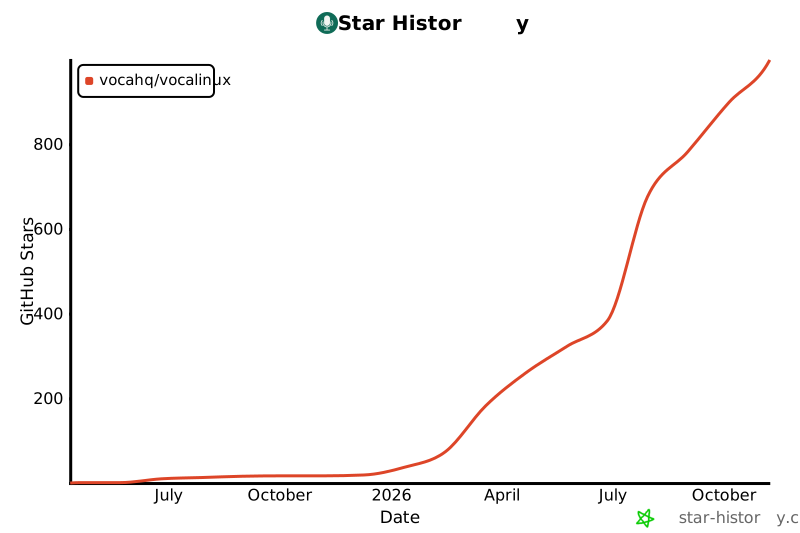](https://www.star-history.com/?type=date&repos=VocaHQ%2Fvocalinux)
|
|
|
|
### Optional Orukeet model
|
|
|
|
With the Parakeet engine installed, Settings → Speech Model → Parakeet also
|
|
offers `orukeet-v0.1.0`. It uses the existing local sherpa-onnx recognizer for
|
|
25 European languages; the recommended Parakeet model and default whisper.cpp
|
|
engine stay unchanged.
|
|
|
|
The download comes from a pinned revision of
|
|
[oruk/orukeet on Hugging Face](https://huggingface.co/oruk/orukeet). Vocalinux
|
|
checks every file against its bundled SHA-256 pins and checks the publisher's
|
|
release manifest against those same pins. The manifest download participates
|
|
in Hugging Face's normal model-download accounting. Cached recognition works
|
|
offline and does not send audio or usage events. The model occupies about
|
|
641 MiB; its CC BY-SA 4.0 weights license and NVIDIA attribution are included.
|