 7664266823
* feat(commands): localize punctuation voice commands by language

Voice command phrases were English-only even when recognition language
was set to Italian, French, etc. Merge locale punctuation/line-break
aliases from the recognition language into CommandProcessor, keep
English phrases available, and document the behavior.

Fixes #640

Co-authored-by: Jatin K Malik <jatinkrmalik@users.noreply.github.com>

* fix(commands): keep line breaks and French apostrophe aliases

Attach-left punctuation now eats only horizontal whitespace, so a
localized "new line" followed by a period or comma still inserts a
newline. French aliases include ASCII, U+2019, and backtick apostrophes,
and longest-match still wins so "point" cannot fire inside
"point d'interrogation".

---------

Co-authored-by: Cursor Agent <cursoragent@cursor.com>
Co-authored-by: Jatin K Malik <jatinkrmalik@users.noreply.github.com>
548 lines
23 KiB
Markdown
548 lines
23 KiB
Markdown
<div align="center">
|
|
|
|
<img src="https://vocalinux.com/brand/vocalinux-mark-circle.svg" width="50" height="50" alt="Vocalinux">
|
|
|
|
# Vocalinux
|
|
|
|
**Voice-to-text for Linux, finally done right!**
|
|
|
|
<!-- Badge rows ordered narrowest → widest (steps out into the hero) -->
|
|
|
|
<!-- Distros (widest; base plate above the hero) -->
|
|
[](docs/DISTRO_COMPATIBILITY.md)
|
|
[](docs/DISTRO_COMPATIBILITY.md)
|
|
[](docs/DISTRO_COMPATIBILITY.md)
|
|
[](docs/DISTRO_COMPATIBILITY.md)
|
|
[](docs/DISTRO_COMPATIBILITY.md)
|
|
|
|
<!-- Values + packaging (narrow) -->
|
|
[](https://github.com/VocaHQ/vocalinux#features)
|
|
[](https://github.com/VocaHQ/vocalinux#features)
|
|
[](CONTRIBUTING.md)
|
|
[](https://www.gnu.org/licenses/agpl-3.0)
|
|
[](https://www.python.org/downloads/)
|
|
|
|
|
|
|
|
<!-- Identity + quality (medium) -->
|
|
|
|
[](https://discord.gg/t6muquAJbm)
|
|
[](https://vocahq.com)
|
|
[](https://x.com/vocahq)
|
|
|
|
[](https://github.com/VocaHQ/vocalinux/releases)
|
|
[](https://pypi.org/project/vocalinux/)
|
|
[](https://aur.archlinux.org/packages/vocalinux)
|
|
|
|
|
|
</div>
|
|
|
|
Linux has always punched above its weight, except when it comes to voice typing. Vocalinux fixes that.
|
|
|
|
It's a free, AGPL-3.0-licensed desktop app that lets you dictate text into *any* application, on X11 or Wayland, using on-device speech recognition after you download a model. Pick from three engines (whisper.cpp, OpenAI Whisper, or VOSK), get automatic GPU acceleration via Vulkan, and control it all with customizable keyboard shortcuts: toggle or push-to-talk.
|
|
|
|
Models are downloaded once. After that, speech-to-text stays on your machine. No Voca account is required. Just speak and type.
|
|
|
|
## 📚 What's New in v0.16.2
|
|
|
|
> **0.16.2** is a stability patch on the 0.16 series. Dictation types again on KDE when a leftover IBus daemon is not the session IM, Wayland and IBus keyboard shortcuts actually fire through wtype/ydotool, "delete that" sends real BackSpace, and the installer pulls glslc on Fedora/Arch. Release builds pin builders and ship checksums; AUR PKGBUILD and distro docs get CI gates.
|
|
|
|
### 0.16 series highlights
|
|
|
|
| Feature | Description |
|
|
|---------|-------------|
|
|
| **Update checker** | Settings → About checks stable/nightly channels; tray shows Update Available when GitHub has a newer release (#631, #645) |
|
|
| **Right Alt PTT default** | New installs default to hold Right Alt (push-to-talk); existing configs keep their shortcut (#648) |
|
|
| **Searchable languages** | Type to filter the Speech Model language list (#672) |
|
|
| **Delete unused models** | Remove leftover downloaded speech models from Settings (#671) |
|
|
| **AGPL-3.0** | License aligned with other VocaHQ projects (#660) |
|
|
| **Family mic icons** | App icon, tray states, and site favicons use the shared Voca family mic (#704) |
|
|
| **Tone picker** | Settings → Audio: Lift, Flick, Ember, Step, Voca, Soft, Chirp, Scale, Drop, Glass, Off, plus Preview. New installs default to Voca. Catalog uses family preview WAVs (#707, #708) |
|
|
| **Installer** | Justfile, uv lockfiles, distro python3-gi required (no pip sdist of PyGObject). Epic #701 still open (#700, #705, #706) |
|
|
|
|
### Bug fixes in v0.16.2
|
|
|
|
- **KDE inject**: skip leftover IBus when it is not the session IM so dictation types into Kate, browsers, and terminals (#753, fixes #752)
|
|
- **Wayland / IBus shortcuts**: wtype and ydotool deliver real chords; IBus sessions route shortcuts to a virtual-keyboard tool (#715, #716)
|
|
- **Delete that**: send real BackSpace key events instead of U+0008 text (#714)
|
|
- **Installer**: Fedora and Arch need glslc/shaderc, not glslang (#763, #604)
|
|
- **Nightly / release**: stamp version before build; release integrity checksums and pinned builders (#762, #759)
|
|
- **CI / docs**: AUR PKGBUILD gate on every PR; distro CI matches the docs (#772, #773)
|
|
- **Site**: VocaGateway family card is Beta; README logo, badges, privacy copy (#765, #764)
|
|
|
|
See [docs/UPDATE.md](docs/UPDATE.md) and the [full changelog](https://github.com/VocaHQ/vocalinux/releases/tag/v0.16.2).
|
|
|
|
---
|
|
|
|
## Features
|
|
|
|
- 🎤 **Toggle or Push-to-Talk** activation modes
|
|
- ⚡ **Real-time transcription** with minimal latency
|
|
- 🌎 **Universal compatibility** across all Linux applications
|
|
- 🔒 **On-device after model download** — speech-to-text stays on your machine
|
|
- 🤖 **whisper.cpp by default** - High-performance C++ speech recognition
|
|
- 🎮 **Universal GPU support** - Vulkan acceleration for AMD, Intel, and NVIDIA
|
|
- 🎨 **System tray integration** with visual status indicators
|
|
- 🚀 **Start on login support** via XDG autostart (desktop-session startup)
|
|
- 🔊 **Pleasant audio feedback** - smooth gliding tones, headphone-friendly
|
|
- ⚙️ **Graphical settings** dialog for easy configuration
|
|
- 📦 **3 engine choices** - whisper.cpp (default), OpenAI Whisper, or VOSK
|
|
|
|
## 📸 Screenshots
|
|
|
|
Vocalinux in action. Settings gallery shots may lag the newest UI. Full gallery on the [website screenshots page](https://vocalinux.com/screenshots/).
|
|
|
|
### Product
|
|
|
|
<table>
|
|
<tr>
|
|
<td align="center" width="50%">
|
|
<img src="web/public/screenshots/00-transcription.png" alt="Transcription in Action" width="350"><br>
|
|
<em>Real-time voice-to-text transcription</em>
|
|
</td>
|
|
<td align="center" width="50%">
|
|
<img src="web/public/screenshots/02-system-tray.png" alt="System Tray" width="350"><br>
|
|
<em>System tray with listening indicator</em>
|
|
</td>
|
|
</tr>
|
|
<tr>
|
|
<td align="center">
|
|
<img src="web/public/screenshots/05-about-view.png" alt="About View" width="350"><br>
|
|
<em>About & Updates in Settings</em>
|
|
</td>
|
|
<td align="center">
|
|
<img src="web/public/screenshots/03-log-viewer.png" alt="Log Viewer" width="350"><br>
|
|
<em>Log viewer for debugging</em>
|
|
</td>
|
|
</tr>
|
|
</table>
|
|
|
|
### Settings
|
|
|
|
<table>
|
|
<tr>
|
|
<td align="center" width="33%">
|
|
<img src="web/public/screenshots/settings-speech-engine.png" alt="Speech Engine settings" width="260"><br>
|
|
<em>Speech Engine</em>
|
|
</td>
|
|
<td align="center" width="33%">
|
|
<img src="web/public/screenshots/settings-recognition.png" alt="Recognition settings" width="260"><br>
|
|
<em>Recognition</em>
|
|
</td>
|
|
<td align="center" width="33%">
|
|
<img src="web/public/screenshots/settings-audio.png" alt="Audio settings" width="260"><br>
|
|
<em>Audio</em>
|
|
</td>
|
|
</tr>
|
|
<tr>
|
|
<td align="center">
|
|
<img src="web/public/screenshots/settings-performance.png" alt="Performance settings" width="260"><br>
|
|
<em>Performance</em>
|
|
</td>
|
|
<td align="center">
|
|
<img src="web/public/screenshots/settings-general.png" alt="General settings" width="260"><br>
|
|
<em>General</em>
|
|
</td>
|
|
<td align="center">
|
|
<img src="web/public/screenshots/settings-advanced.png" alt="Advanced tuning and settings" width="260"><br>
|
|
<em>Advanced</em>
|
|
</td>
|
|
</tr>
|
|
</table>
|
|
|
|
## 🚀 Quick Install
|
|
|
|
### Interactive Install (Recommended)
|
|
|
|
Our new interactive installer guides you through setup with intelligent hardware detection:
|
|
|
|
```bash
|
|
curl -fsSL raw.githubusercontent.com/VocaHQ/vocalinux/main/install.sh -o /tmp/vl.sh && bash /tmp/vl.sh
|
|
```
|
|
|
|
**Choose your engine:**
|
|
1. **whisper.cpp** ⭐ (Recommended) - Fast, works with any GPU via Vulkan
|
|
2. **Whisper** (OpenAI) - PyTorch-based, NVIDIA GPU only
|
|
3. **VOSK** - Lightweight, works on older systems
|
|
|
|
The installer will:
|
|
- **Auto-detect your hardware** (GPU, RAM, Vulkan support)
|
|
- **Recommend the best engine** for your system
|
|
- **Download the appropriate model** (~74MB for the default whisper.cpp tiny model)
|
|
- **Install neural VAD support** when ONNX Runtime is available
|
|
- **Install in ~1-2 minutes** (vs 5-10 min with old Whisper)
|
|
|
|
> **Note**: Always installs the latest release. For a specific version, check [GitHub Releases](https://github.com/VocaHQ/vocalinux/releases).
|
|
|
|
### Installation Options
|
|
|
|
**Default (whisper.cpp - recommended):**
|
|
```bash
|
|
curl -fsSL raw.githubusercontent.com/VocaHQ/vocalinux/main/install.sh -o /tmp/vl.sh && bash /tmp/vl.sh
|
|
```
|
|
Fastest installation (~1-2 min), universal GPU support via Vulkan.
|
|
|
|
**Whisper (OpenAI) - if you prefer PyTorch:**
|
|
```bash
|
|
curl -fsSL raw.githubusercontent.com/VocaHQ/vocalinux/main/install.sh -o /tmp/vl.sh && bash /tmp/vl.sh --engine=whisper
|
|
```
|
|
NVIDIA GPU only (~5-10 min, downloads PyTorch + CUDA).
|
|
|
|
**VOSK only - for low-RAM systems:**
|
|
```bash
|
|
curl -fsSL raw.githubusercontent.com/VocaHQ/vocalinux/main/install.sh -o /tmp/vl.sh && bash /tmp/vl.sh --engine=vosk
|
|
```
|
|
Lightweight option (~40MB), works on systems with 4GB RAM.
|
|
|
|
### Arch Linux (AUR)
|
|
|
|
```bash
|
|
yay -S vocalinux
|
|
```
|
|
|
|
See [docs/AUR.md](docs/AUR.md).
|
|
|
|
### Flatpak (any distro)
|
|
|
|
GitHub Releases attach `Vocalinux-<version>-x86_64.flatpak` and
|
|
`Vocalinux-<version>-aarch64.flatpak`. After the Flathub GNOME runtime is
|
|
present, install with `flatpak install --user ./Vocalinux-<version>-x86_64.flatpak`.
|
|
Bundles do not auto-update.
|
|
|
|
For a local build (contributors), use the bundled manifest:
|
|
|
|
```bash
|
|
flatpak install flathub org.gnome.Platform//50 org.gnome.Sdk//50
|
|
flatpak-builder --user --install --force-clean build-dir \
|
|
packaging/flatpak/com.vocalinux.Vocalinux.yml
|
|
flatpak run com.vocalinux.Vocalinux
|
|
```
|
|
|
|
The Flatpak ships the whisper.cpp engine with Vulkan GPU support and runs through
|
|
XWayland on Wayland sessions. See [`packaging/flatpak/README.md`](packaging/flatpak/README.md)
|
|
for build details and permissions. It is **not on Flathub**: the submission
|
|
([flathub/flathub#9368](https://github.com/flathub/flathub/pull/9368)) was closed
|
|
on 2026-07-23 on policy grounds. Release `.flatpak` assets are tracked in
|
|
[#784](https://github.com/VocaHQ/vocalinux/issues/784); the longer-term channel
|
|
is [#167](https://github.com/VocaHQ/vocalinux/issues/167).
|
|
|
|
### Alternative: Install from Source
|
|
|
|
```bash
|
|
# Clone the repository
|
|
git clone https://github.com/VocaHQ/vocalinux.git
|
|
cd vocalinux
|
|
|
|
# Run the interactive installer (engine picker + GPU detection)
|
|
./install.sh
|
|
|
|
# Or pick the engine up front
|
|
./install.sh --engine=whisper_cpp # whisper.cpp (default, GPU-accelerated)
|
|
./install.sh --engine=vosk # lightweight VOSK
|
|
./install.sh --engine=parakeet --auto # Parakeet (25 European languages, CPU)
|
|
```
|
|
|
|
The installer handles everything: system dependencies, Python environment, speech models, and desktop integration.
|
|
|
|
### Snap (Ubuntu Snap Store)
|
|
|
|
In-repo recipe: `snap/snapcraft.yaml` (issue [#48](https://github.com/VocaHQ/vocalinux/issues/48)). Store listing: [snapcraft.io/vocalinux](https://snapcraft.io/vocalinux). Pack and upload steps: [docs/INSTALL.md](docs/INSTALL.md).
|
|
|
|
```bash
|
|
sudo snap install vocalinux --edge # current public channel (0.16.2 refresh)
|
|
# sudo snap install vocalinux --candidate # after candidate release
|
|
# sudo snap install vocalinux # after stable promotion
|
|
sudo snap connect vocalinux:audio-record # if mic is not auto-connected
|
|
sudo snap connect vocalinux:raw-input # global keyboard shortcuts (evdev)
|
|
```
|
|
|
|
### 🌙 Nightly Releases (Bleeding Edge)
|
|
|
|
For developers and early adopters who want to test the latest features, check out our [GitHub Releases page](https://github.com/VocaHQ/vocalinux/releases) which includes both beta and nightly builds.
|
|
|
|
> **⚠️ Warning**: Nightly releases contain the absolute latest code and may be unstable. For production use, we recommend using the latest beta release.
|
|
|
|
Nightly builds are automatically generated from the `main` branch every day. They include all merged changes but haven't undergone the same testing as beta releases.
|
|
|
|
**Release Channels:**
|
|
- **Beta** (Recommended) - Tested pre-releases with known features
|
|
- **Nightly** - Untested bleeding edge with latest commits
|
|
|
|
### After Installation
|
|
|
|
```bash
|
|
# If ~/.local/bin is in your PATH (recommended):
|
|
vocalinux
|
|
|
|
# Or activate the virtual environment first:
|
|
source ~/.local/bin/activate-vocalinux.sh
|
|
vocalinux
|
|
|
|
# Or run directly:
|
|
~/.local/share/vocalinux/venv/bin/vocalinux
|
|
```
|
|
|
|
Or launch it from your application menu!
|
|
|
|
## 📋 Requirements
|
|
|
|
- **OS**: Linux (tested on Ubuntu 24.04+, Debian 12+, Fedora 42+, Arch Linux, openSUSE Tumbleweed)
|
|
- **Python**: 3.11 or newer
|
|
- **Display**: X11 or Wayland
|
|
- **Hardware**: Microphone for voice input
|
|
|
|
**Note:** See [Distribution Compatibility](docs/DISTRO_COMPATIBILITY.md) for distribution-specific information and experimental support for Gentoo, Alpine, Void, Solus, and more.
|
|
|
|
## 🎙️ Usage
|
|
|
|
### Voice Dictation
|
|
|
|
1. **Push-to-talk (default)**: Hold Right Alt (Option on Mac-layout keyboards) and speak
|
|
2. Speak clearly into your microphone
|
|
3. **Release** the key to stop, or switch to **Toggle mode** in Settings (double-tap a key to start/stop)
|
|
|
|
### Voice Commands
|
|
|
|
English phrases always work. With a non-English recognition language, matching
|
|
punctuation / line-break phrases in that language are also recognized
|
|
(Italian *virgola* / *punto*, French *virgule* / *point*, etc.).
|
|
|
|
| Command | Action |
|
|
|---------|--------|
|
|
| "new line" | Inserts a line break |
|
|
| "period" / "full stop" / "dot" | Types a period (.) |
|
|
| "comma" | Types a comma (,) |
|
|
| "question mark" | Types a question mark (?) |
|
|
| "exclamation mark" | Types an exclamation mark (!) |
|
|
| "delete that" | Deletes the last sentence |
|
|
| "capitalize" | Capitalizes the next word |
|
|
|
|
### Command Line Options
|
|
|
|
```bash
|
|
vocalinux --help # Show all options
|
|
vocalinux --debug # Enable debug logging
|
|
vocalinux --engine whisper_cpp # Use whisper.cpp engine (default)
|
|
vocalinux --engine whisper # Use OpenAI Whisper engine
|
|
vocalinux --engine vosk # Use VOSK engine
|
|
vocalinux --model medium # Use medium-sized model
|
|
vocalinux --model medium.en-q5_0 # Use exact whisper.cpp model variant
|
|
vocalinux --model large-v3-turbo # Use large-v3 Turbo with whisper.cpp
|
|
vocalinux --wayland # Force Wayland mode
|
|
vocalinux --start-minimized # Start without first-run modal prompts
|
|
```
|
|
|
|
### Autostart on Login
|
|
|
|
Vocalinux uses the Linux desktop standard for autostart:
|
|
|
|
- **Mechanism**: XDG autostart desktop entry (`vocalinux.desktop`)
|
|
- **Path**: `$XDG_CONFIG_HOME/autostart/` or `~/.config/autostart/` (fallback)
|
|
- **Launch mode**: Starts as a regular **user desktop app** in your graphical session
|
|
- **Not used**: No `systemd` unit/service is created by Vocalinux for autostart
|
|
|
|
How to enable/disable:
|
|
|
|
- First-run welcome dialog
|
|
- Tray menu: **Start on Login**
|
|
- Settings dialog: **Start on Login**
|
|
|
|
Compatibility notes:
|
|
|
|
- Works on mainstream desktop environments (GNOME, KDE, Xfce, Cinnamon, MATE, LXQt)
|
|
- On minimal/custom window-manager sessions, an autostart handler may be required
|
|
(for example DE-specific startup hooks or tools like `dex`)
|
|
|
|
## ⚙️ Configuration
|
|
|
|
Configuration is stored in `~/.config/vocalinux/config.json`:
|
|
|
|
```json
|
|
{
|
|
"speech_recognition": {
|
|
"engine": "whisper_cpp",
|
|
"model_size": "tiny",
|
|
"vad_sensitivity": 3,
|
|
"silence_timeout": 2.0
|
|
}
|
|
}
|
|
```
|
|
|
|
For whisper.cpp, `model_size` may be a size such as `tiny` or an exact ggml model ID
|
|
such as `medium.en-q5_0` or `large-v3-turbo`. You can also configure this through
|
|
the graphical Settings dialog, where whisper.cpp models are split into **Model Size**
|
|
and **Specialization** controls. Unused leftover downloads can be deleted from
|
|
**Unused downloads** on the Speech Model page (expand the section, then delete
|
|
one model at a time).
|
|
|
|
### Neural Voice Activity Detection
|
|
|
|
Vocalinux ships with a Silero VAD model and uses it automatically when `onnxruntime` is available. The official installer attempts to install this support automatically. Without it, recording falls back to the simpler amplitude-threshold VAD.
|
|
|
|
For manual or PyPI installs, enable neural VAD with:
|
|
|
|
```bash
|
|
pip install "vocalinux[vad]"
|
|
```
|
|
|
|
Restart Vocalinux after install. The Recognition tab in Settings shows which backend is active. The same `vad_sensitivity` (1-5) works for both -- it's mapped to a Silero probability threshold internally (1 = 0.8, 5 = 0.3).
|
|
|
|
## 🔧 Development Setup
|
|
|
|
```bash
|
|
# Clone and install in dev mode
|
|
git clone https://github.com/VocaHQ/vocalinux.git
|
|
cd vocalinux
|
|
./install.sh --dev
|
|
|
|
# Activate environment
|
|
source venv/bin/activate
|
|
|
|
# Run tests
|
|
pytest
|
|
|
|
# Run from source with debug
|
|
python -m vocalinux.main --debug
|
|
```
|
|
|
|
## 📁 Project Structure
|
|
|
|
```
|
|
vocalinux/
|
|
├── src/vocalinux/ # Main application code
|
|
│ ├── speech_recognition/ # Speech recognition engines (VOSK, Whisper, whisper.cpp)
|
|
│ │ └── recognition_manager.py # Unified engine interface
|
|
│ ├── text_injection/ # Text injection (X11/Wayland)
|
|
│ ├── ui/ # GTK UI components
|
|
│ └── utils/ # Utility functions
|
|
│ ├── whispercpp_model_info.py # whisper.cpp model metadata & hardware detection
|
|
│ └── vosk_model_info.py # VOSK model metadata
|
|
├── tests/ # Test suite
|
|
├── scripts/ # Development utilities
|
|
│ └── generate_sounds.py # Sound generation script
|
|
├── resources/ # Icons and sounds
|
|
├── docs/ # Documentation
|
|
└── web/ # Website source
|
|
```
|
|
|
|
## 📖 Documentation
|
|
|
|
- [Installation Guide](docs/INSTALL.md) - Detailed installation instructions
|
|
- [Update Guide](docs/UPDATE.md) - How to update Vocalinux
|
|
- [User Guide](docs/USER_GUIDE.md) - Complete user documentation
|
|
- [Distribution Compatibility](docs/DISTRO_COMPATIBILITY.md) - Distro/session behavior and caveats
|
|
- [Contributing](CONTRIBUTING.md) - Development setup and contribution guidelines
|
|
|
|
## Repository mirrors
|
|
|
|
GitHub is the **primary** forge for issues, pull requests, CI, and releases.
|
|
|
|
| Role | URL |
|
|
|------|-----|
|
|
| Primary | https://github.com/VocaHQ/vocalinux |
|
|
| Read-only mirror (Codeberg) | https://codeberg.org/jatinkrmalik/vocalinux |
|
|
|
|
The Codeberg copy is a read-only source backup. Open issues and PRs on GitHub only.
|
|
|
|
## 🔊 Sound Customization
|
|
|
|
Vocalinux uses smooth, pleasant gliding tones for audio feedback:
|
|
|
|
- **Start**: Ascending F4→A4 (0.6s) - positive, uplifting
|
|
- **Stop**: Descending A4→F4 (0.6s) - resolves completion
|
|
- **Error**: Lower descending E4→C4 (0.7s) - gentle but noticeable
|
|
|
|
All sounds use pure sine waves with smoothstep interpolation for buttery smooth pitch transitions - perfect for headphone use!
|
|
|
|
### Regenerate Sounds
|
|
|
|
To modify or regenerate the notification sounds:
|
|
|
|
```bash
|
|
python scripts/generate_sounds.py
|
|
```
|
|
|
|
This script generates all three sounds using the same smooth glide algorithm. You can edit the frequencies, durations, and amplitudes in the script to customize the sounds to your preference.
|
|
|
|
## 🗺️ Roadmap
|
|
|
|
- [x] ~~Custom icon design~~ ✅
|
|
- [x] ~~Graphical settings dialog~~ ✅
|
|
- [x] ~~Whisper AI support~~ ✅
|
|
- [x] ~~Multi-language support (FR, DE, RU)~~ ✅
|
|
- [x] ~~whisper.cpp integration (default engine)~~ ✅
|
|
- [x] ~~Vulkan GPU support~~ ✅
|
|
- [x] In-app update mechanism ✅
|
|
- [x] ~~Wayland support via IBus~~ ✅
|
|
- [x] ~~Flatpak packaging~~ ✅ (manifest ships; not on Flathub — see #167)
|
|
- [ ] Application-specific commands
|
|
- [ ] Debian/Ubuntu package (.deb)
|
|
- [ ] Voice command customization
|
|
|
|
## 🌐 The Voca Ecosystem
|
|
|
|
Vocalinux is part of [VocaHQ](https://vocahq.com). On-device speech-to-text first, one app per platform. Optional [VocaGateway](https://vocagateway.vocahq.com) is self-hosted and not on-device.
|
|
|
|
| Platform | Project | Website | GitHub | Status |
|
|
|----------|---------|---------|--------|--------|
|
|
| 🐧 Linux | **VocaLinux** | [vocalinux.com](https://vocalinux.com) | [VocaHQ/vocalinux](https://github.com/VocaHQ/vocalinux) | ✅ Available now (`v0.16.2`) |
|
|
| 🍎 macOS | **VocaMac** | [vocamac.com](https://vocamac.com) | [VocaHQ/vocamac](https://github.com/VocaHQ/vocamac) | 🚀 Beta (`v0.9.0`) |
|
|
| 🪟 Windows | **VocaWin** | [vocawin.com](https://vocawin.com) | [VocaHQ/vocawin](https://github.com/VocaHQ/vocawin) | 🚀 Unsigned beta (`v0.1.0-beta.1`) |
|
|
| 📱 Phone | **VocaPhone** | [vocaphone.vocahq.com](https://vocaphone.vocahq.com) | [VocaHQ/vocaphone](https://github.com/VocaHQ/vocaphone) | 🚀 Android beta / iOS [TestFlight](https://testflight.apple.com/join/wd85wQ3W) |
|
|
| 🖧 Gateway | **VocaGateway** | [vocagateway.vocahq.com](https://vocagateway.vocahq.com) | [VocaHQ/vocagateway](https://github.com/VocaHQ/vocagateway) | 🧪 Beta · optional · not on-device |
|
|
|
|
> VocaWin is unsigned. SmartScreen may warn about an unknown publisher. It is not a Microsoft Store ship.
|
|
>
|
|
> Each platform uses native technologies. The shared bar is on-device first; [VocaGateway](https://vocagateway.vocahq.com) is optional self-hosted compute and is not on-device.
|
|
>
|
|
> Talk to us: [Discord](https://discord.gg/t6muquAJbm) · [X @vocahq](https://x.com/vocahq) · [hello@vocahq.com](mailto:hello@vocahq.com)
|
|
|
|
## 🤝 Contributing
|
|
|
|
We welcome contributions! Whether it's bug reports, feature requests, or code contributions, please check out our [Contributing Guide](CONTRIBUTING.md).
|
|
|
|
### Contributors
|
|
|
|
Thanks to everyone who has contributed to Vocalinux! 🙌
|
|
|
|
<a href="https://github.com/VocaHQ/vocalinux/graphs/contributors">
|
|
<img src="https://contrib.rocks/image?repo=VocaHQ/vocalinux" />
|
|
</a>
|
|
|
|
### Quick Links
|
|
|
|
- 🐛 [Report a Bug](https://github.com/VocaHQ/vocalinux/issues/new?template=bug_report.md)
|
|
- 💡 [Request a Feature](https://github.com/VocaHQ/vocalinux/issues/new?template=feature_request.md)
|
|
- 💬 [Discussions](https://github.com/VocaHQ/vocalinux/discussions)
|
|
|
|
|
|
## ⭐ Support
|
|
|
|
If you find Vocalinux useful, please consider:
|
|
- ⭐ Starring this repository
|
|
- 🐛 Reporting bugs you encounter
|
|
- 📖 Improving documentation
|
|
- 🔀 Contributing code
|
|
|
|
## 📜 License
|
|
|
|
This project is licensed under the **GNU Affero General Public License v3.0**
|
|
([AGPL-3.0](LICENSE)), aligning with the other [VocaHQ](https://github.com/VocaHQ)
|
|
distribution projects ([VocaMac](https://github.com/VocaHQ/vocamac),
|
|
[VocaPhone](https://github.com/VocaHQ/vocaphone),
|
|
[VocaGateway](https://github.com/VocaHQ/vocagateway)).
|
|
|
|
You may use, study, modify, and redistribute the software under AGPL-3.0. If you
|
|
run a modified version as a network service, AGPL also requires that you make the
|
|
corresponding source available.
|
|
|
|
## Star Chart
|
|
|
|
[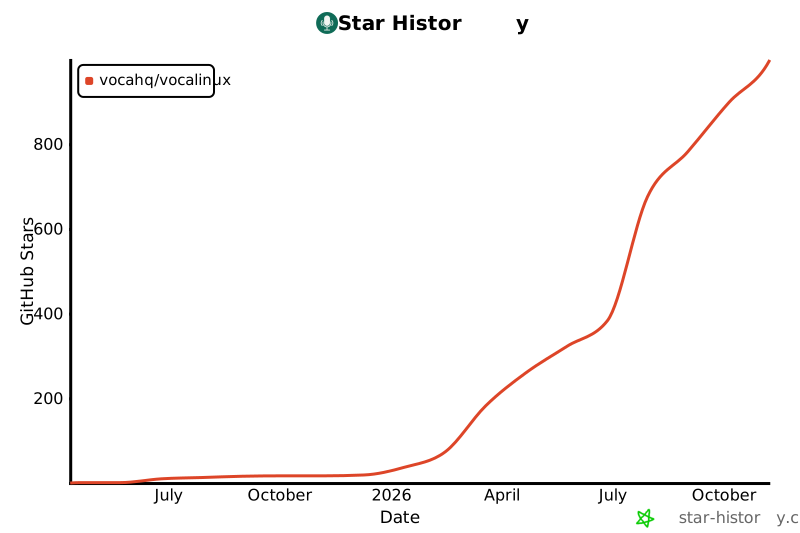](https://www.star-history.com/?type=date&repos=VocaHQ%2Fvocalinux)
|
|
|
|
---
|
|
|
|
<p align="center">
|
|
Made with ❤️ for the Linux community
|
|
</p>
|